
At Bing, webmasters don’t have to wait to get their content crawled and indexed. Bing offers webmaster the abilities to tell Bing about the latest changes in their sites, such as providing latest added, updated or deleted content and URLs.
Bing already supports the ability for webmasters to notify Bing about URL changes via its Bing URL submission API (setup guide) but now also the ability to notify Bing directly about URL along with content changes via Bing Content Submission API. This will not only help webmasters to reach to more relevant users on Bing but also will reduce bing crawler bingbot crawl load on their sites. This blog post will provide a generic overview along with step-by-step instruction on adopting the same.
Step 1: Generate an API Key
Webmasters need an API key to be able to access and use Bing Webmaster APIs. This API key can be generated from Bing Webmaster Tools by following these steps:
-
Sign in to your account on Bing Webmaster Tools. In case you do not already have a Bing Webmaster account, sign up today using any of Microsoft, Google or Facebook ID.
-
Add & verify the site that you want to submit URL for through the API, if not already done.
-
Click on Settings button on top right corner and then go to API Access section. If you are generating the API key for the first time, please click Generate to create an API Key. Else you will see the key previously generated
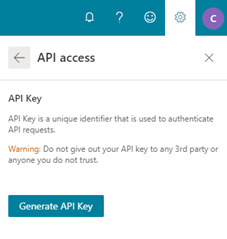
Note: Please note that the API key is generated for a user and not a site and hence a user can use the same API key for all their verified sites on Bing Webmaster Tools.You can change your API key anytime; change is taken by the system within 30 minutes.
Step 2: Integrate with your website and start submitting content
You can use any of the below protocols to easily integrate the Webmaster API SubmitContent method into your system.
XML request sample
XML
POST /webmaster/api.svc/pox/SubmitContent?apikey=EEDECC1EA4AE341CC57365E075EBC8B6 HTTP/1.1
Content-Type: application/xml; charset=utf-8
Host: ssl.bing.com

<SubmitContent xmlns="http://schemas.datacontract.org/2004/07/Microsoft.Bing.Webmaster.Api">
<siteUrl>http://example.com</siteUrl>
<url>http://example.com/url1.html</url>
<httpMessage>SFRUUC8xLjEgMjAwIE9LCkRhdGU6IFN1biwgMTAgT2N0IDIwMTcgMjM6MjY6MDcgR01UCkFjY2VwdC1SYW5nZXM6IGJ5dGVzCkNvbnRlbnQtTGVuZ3RoOiAxMwpDb25uZWN0aW9uOiBjbG9zZQpDb250ZW50LVR5cGU6IHRleHQvaHRtbAoKSGVsbG8gd29ybGQh</httpMessage>
<structuredData></structuredData>
<dynamicServing>0</dynamicServing>
</SubmitContent>
Note: httpMessage value should be the base64 encoded version
Sample:
/html-encode.PNG?lang=en-US&width=500&height=318 "html encode")
JSON request sample
POST /webmaster/api.svc/json/SubmitContent?apikey=EEDECC1EA4AE341CC57365E075EBC8B6 HTTP/1.1
Content-Type: application/json; charset=utf-8
Host: ssl.bing.com

{
"siteUrl":"http://example.com",
"url":"http://example.com/url1.html",
"httpMessage":"SFRUUC8xLjEgMjAwIE9LCkRhdGU6IFN1biwgMTAgT2N0IDIwMTcgMjM6MjY6MDcgR01UCkFjY2VwdC1SYW5nZXM6IGJ5dGVzCkNvbnRlbnQtTGVuZ3RoOiAxMwpDb25uZWN0aW9uOiBjbG9zZQpDb250ZW50LVR5cGU6IHRleHQvaHRtbAoKSGVsbG8gd29ybGQh",
"structuredData":"",
"dynamicServing":"0"
}
If the URL submission is successful you will receive an http 200 response. This ensures that your pages will be discovered for indexing and if Bing webmaster guidelines are met then the pages will be crawled and indexed in real time.
Using any of the above methods you should be able to directly and automatically let Bing know whenever there are content changes in your website. We encourage you to integrate such solution in your Web Content Management System to let Bing auto discover your new content at publication time.
In case you face any challenges during the integration, you can reach out at bwtsupport@microsoft.com.
Thanks!
Bing Webmaster Tools team